 AutoGem
Batch generate ChatGPT images with automatic downloads
Paste a list of prompts and AutoGem runs them on chatgpt.com one after another. Every image saves to your folder, so you’re not clicking download on each result.
AutoGem is free. Your ChatGPT account and its image generation limits still apply. See details.
ChatGPT results in the AutoGem queue
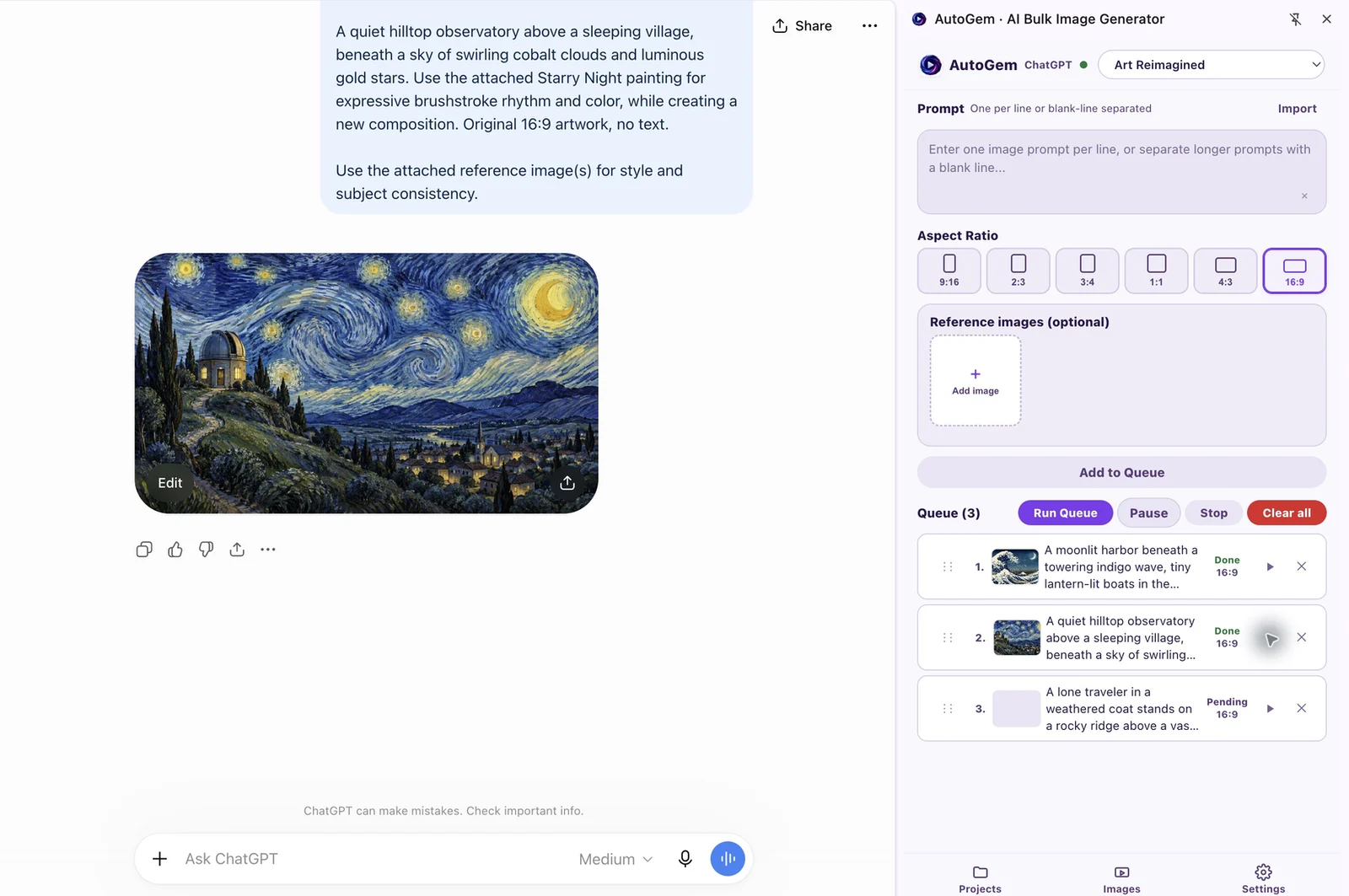
Automate ChatGPT image generation in four steps
Set up the browser session, add the scenes, and collect the results.
-
Install AutoGem and choose a folder
Add AutoGem from the Chrome Web Store, sign in to the extension, and choose a download folder. Allow folder access when Chrome asks.
-
Open ChatGPT with image access
Sign in at chatgpt.com with an account that can generate images. Leave the tab open; AutoGem works through it.
-
Add prompts, framing, and references
Paste one prompt per line. Pick an aspect ratio and any reference images, then add the prompts to the queue. Try a few rows before a big run.
-
Run the queue and check the results
AutoGem sends the prompts one at a time. Keep the side panel open so images save to your folder, then check for failed rows or export warnings.
Try a three-scene storyboard
These three prompts follow a hilltop observatory from dusk to dawn. Each line describes its scene in full, so you can rerun or replace one without touching the others. Pick one aspect ratio before adding them.
Copy the prompts or download the list. Results vary by model and account.
The palette and subject repeat in every row. That’s what makes the scenes look like one set. Attach a reference image if you need a closer match, and check that the location stays consistent from scene to scene.
ChatGPT batch questions
Does AutoGem require an OpenAI API key?
No. AutoGem automates the ChatGPT website you’re signed in to. You need a ChatGPT account that can generate images, not an API subscription.
Does AutoGem automatically save ChatGPT images?
Yes. Pick a download folder, allow access, and keep the side panel open while the queue runs. If you see an export warning, check the folder: the image was generated, but saving it may have failed.
Can I resume without rerunning finished prompts?
Yes, if you paused it. Resume picks up where the run left off. After Stop, or once a run finishes, a new run starts from the first item again, including ones already done.
Are failed ChatGPT prompts automatically retried?
No. Read the error and look at the ChatGPT conversation first. Restarting the whole queue reruns finished items too, so put the prompts you want to retry in a short new queue.
Can AutoGem guarantee a consistent character across scenes?
No. Repeating the description and attaching a reference image help, but details can still drift between scenes. Run a short test before you commit to a long storyboard.
Can ChatGPT limits interrupt a batch?
Yes. AutoGem uses your ChatGPT account and can’t raise its limits. If ChatGPT asks you to do something or stops returning images, check the page and the queue message before you continue.
More on ChatGPT
Queue up your ChatGPT prompts
Install AutoGem, paste your list, and let it run. Images save to your folder as they finish.
 Download for
Google Chrome
Download for
Google Chrome