 AutoGem
How to keep an AI character consistent across a whole book
Your story needs the same character on every page. AI image tools can make one lovely picture, then draw a slightly different character in the next. This guide shows the method that keeps your character recognizable from the first page to the last: one reference image, one fixed description, and a check on every result.
What you will end up with
- 1approved character reference
- 8first-pass scenes
- 30–50images for a picture book
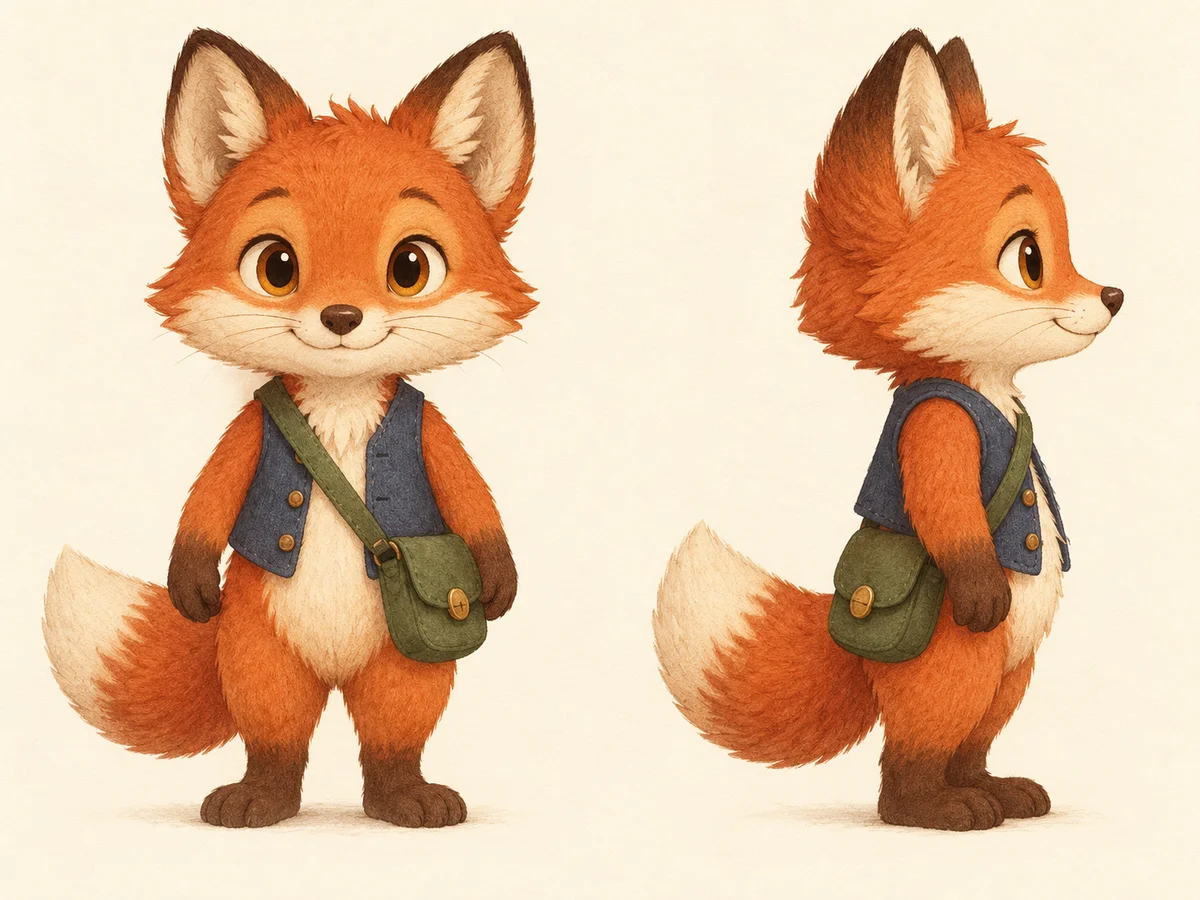
A character sheet (one approved reference image plus a fixed description) and a set of scene illustrations where your character looks like the same character in every one.
A standard 32-page picture book has around 12 to 15 illustrated spreads. Plan on two or three attempts per scene to get a keeper, so expect to generate 30 to 50 images for a full book. That volume is why the bulk step matters.
Before you start
- Your story, broken into pages or scenes. Know what happens in each picture before you generate anything.
- A ChatGPT or Gemini account that can make images. Both accept a reference image. Free plans limit how many images you get per day.
- AutoGem, a free Chrome extension, for the bulk part in step 6.
1Design the character once, on its own
Before any scenes, make a clean reference image of the character: full body, facing forward, standing, on a plain background. Generate a dozen versions and pick the one you love.
That image becomes the source of truth for the whole book. Save it somewhere safe and keep it apart from your scene images, so a slightly-off scene never becomes the new reference by accident.
2Write down exactly what never changes
Describe the character in four to six specific details, and the art style in one line. You will paste both into every prompt. Be precise: “forest-green satchel with one brass clasp” holds steady across images; “a bag” does not.
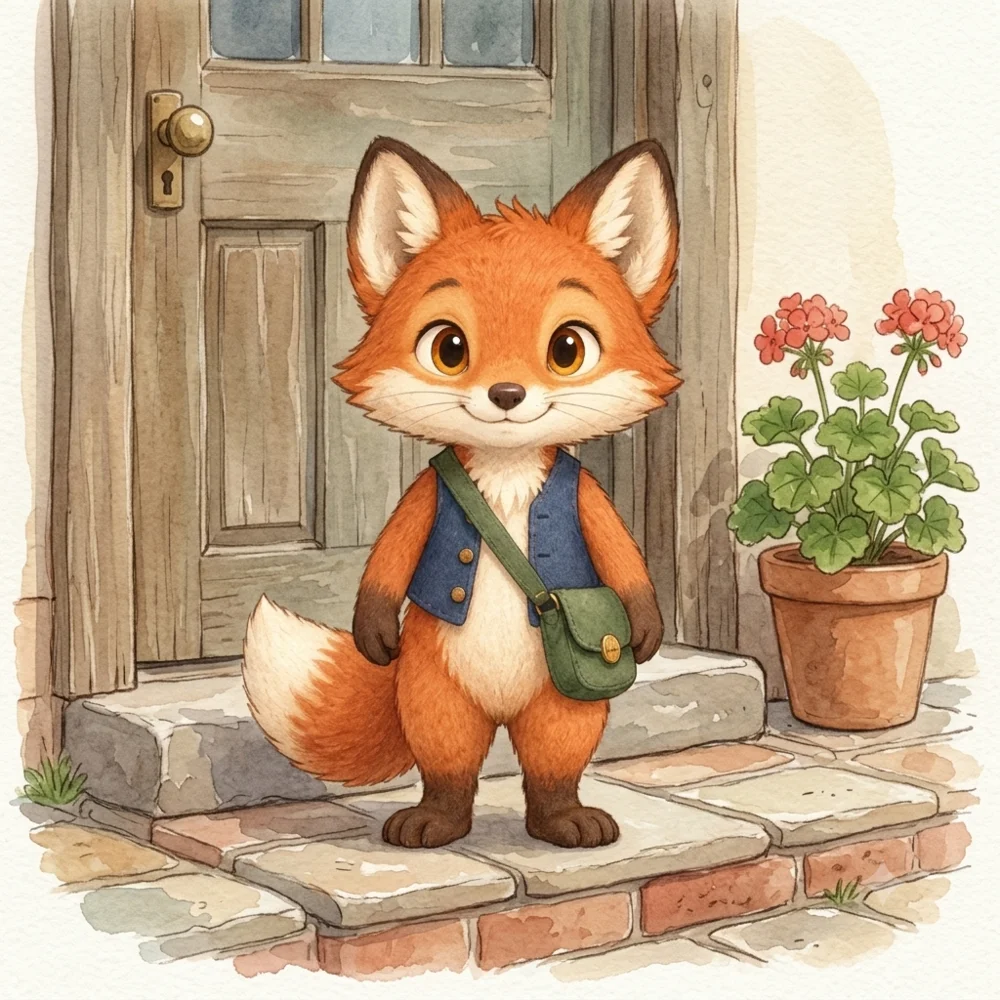
Here is the sheet for Tobi, our example character, a fox courier. Download Tobi’s reference sheet to try the prompts below.
- Face and body
- Red fox, cream muzzle and tail tip, amber eyes, pointed ears.
- Outfit
- Forest-green cross-body satchel with one brass clasp, short indigo waistcoat.
- Proportions
- Small and upright, oversized head, short legs.
- Art style
- Soft watercolor texture, clean rounded outlines, warm muted palette.
Pick details you can check at a glance. Those become your checklist in step 7.
3Change one thing at a time
Characters drift most when everything changes at once: new place, new pose, new angle, new lighting. So build up in passes.
- First pass: same standing pose and daylight, only the location changes. This shows you whether the character holds steady at all.
- Second pass: add simple actions, one at a time: walking, waving, holding a letter.
- Last: the tricky shots. Running, sitting, seen from behind, or several characters together.
Our example uses eight locations from Tobi’s delivery route: a village lane, a stone bridge, a woodland path, a market square, a cottage doorstep, a riverside path, a hill with a windmill, and the post office.
4Write the scene prompts
Every prompt follows the same pattern. Only the scene changes.
- Pattern
- Create a picture-book illustration of [name], [character description], [pose] [in / on / at the scene]. Use the attached character reference for identity, outfit, and proportions. Show the full character clearly, [lighting], [art style], no other characters, no lettering or logos.
Yes, the full description repeats in every prompt. That is on purpose. Each image is generated on its own, and the repetition is what keeps the details from wandering.
Here are the eight first-pass prompts for Tobi.
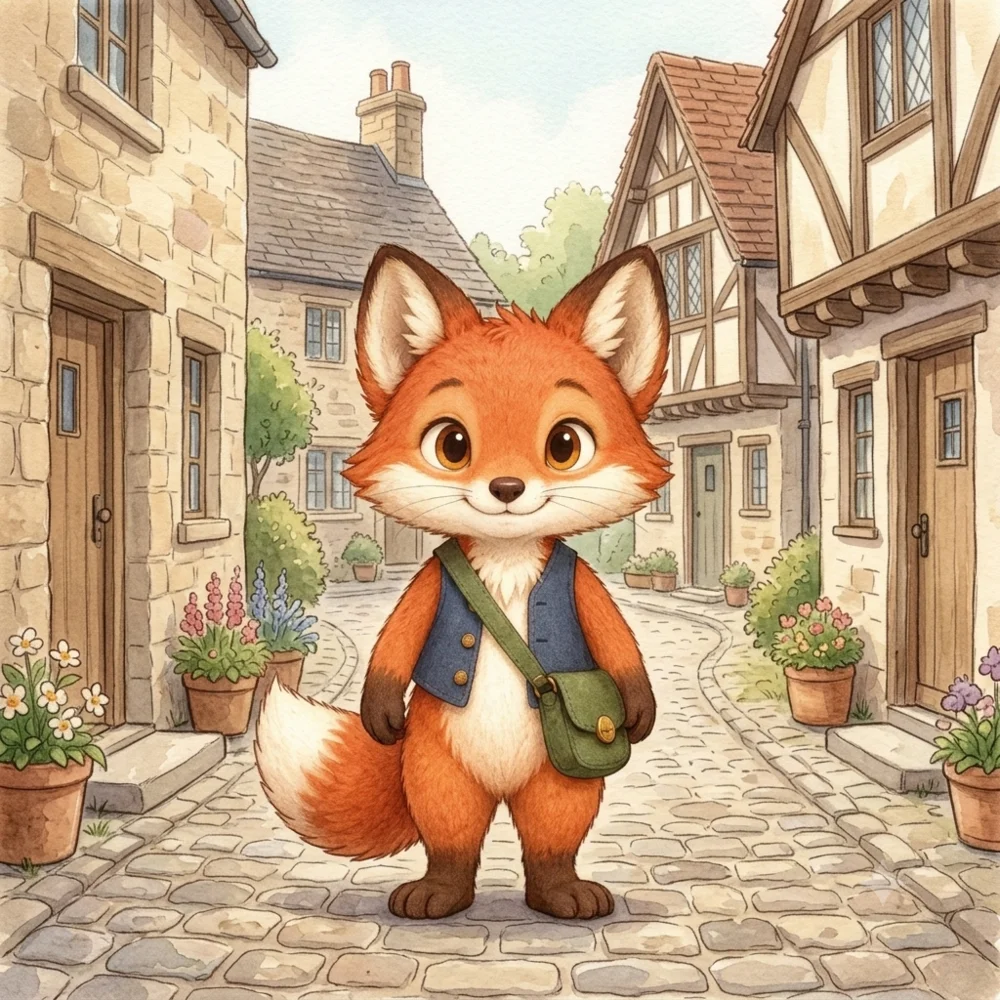
- Create a picture-book illustration of Tobi, a small upright red fox with a cream muzzle and tail tip, amber eyes, pointed ears, a forest-green cross-body satchel with one brass clasp, a short indigo waistcoat, an oversized head, and short legs, standing on both feet in a quiet village lane. Use the attached approved character reference for identity, outfit, and proportions. Show the full character clearly, gentle daylight, soft watercolor texture, clean rounded outlines, warm muted palette, no other characters, no lettering or logos.
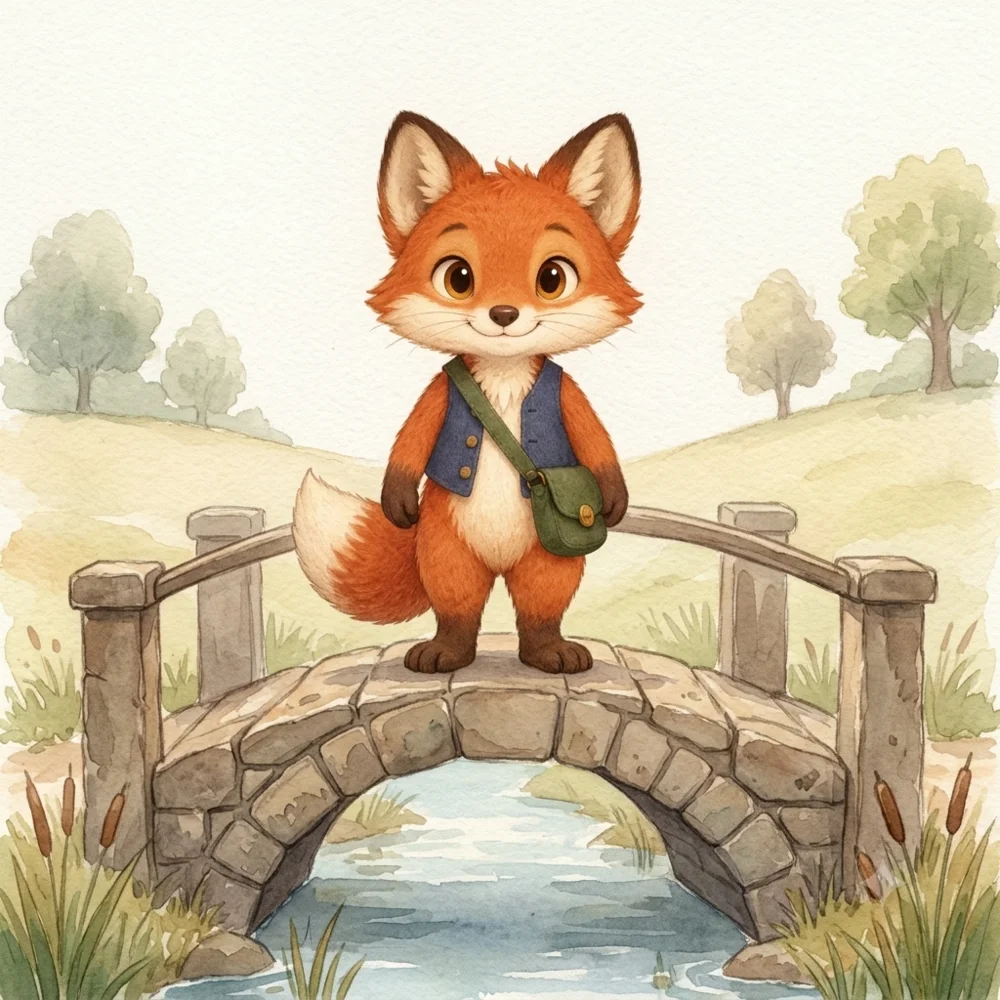
- Create a picture-book illustration of Tobi, a small upright red fox with a cream muzzle and tail tip, amber eyes, pointed ears, a forest-green cross-body satchel with one brass clasp, a short indigo waistcoat, an oversized head, and short legs, standing on both feet on a small stone bridge. Use the attached approved character reference for identity, outfit, and proportions. Show the full character clearly, gentle daylight, soft watercolor texture, clean rounded outlines, warm muted palette, no other characters, no lettering or logos.
- Create a picture-book illustration of Tobi, a small upright red fox with a cream muzzle and tail tip, amber eyes, pointed ears, a forest-green cross-body satchel with one brass clasp, a short indigo waistcoat, an oversized head, and short legs, standing on both feet on a woodland path. Use the attached approved character reference for identity, outfit, and proportions. Show the full character clearly, gentle daylight, soft watercolor texture, clean rounded outlines, warm muted palette, no other characters, no lettering or logos.
- Create a picture-book illustration of Tobi, a small upright red fox with a cream muzzle and tail tip, amber eyes, pointed ears, a forest-green cross-body satchel with one brass clasp, a short indigo waistcoat, an oversized head, and short legs, standing on both feet in a village market square with empty stalls. Use the attached approved character reference for identity, outfit, and proportions. Show the full character clearly, gentle daylight, soft watercolor texture, clean rounded outlines, warm muted palette, no other characters, no lettering or logos.
- Create a picture-book illustration of Tobi, a small upright red fox with a cream muzzle and tail tip, amber eyes, pointed ears, a forest-green cross-body satchel with one brass clasp, a short indigo waistcoat, an oversized head, and short legs, standing on both feet on a cottage doorstep. Use the attached approved character reference for identity, outfit, and proportions. Show the full character clearly, gentle daylight, soft watercolor texture, clean rounded outlines, warm muted palette, no other characters, no lettering or logos.
- Create a picture-book illustration of Tobi, a small upright red fox with a cream muzzle and tail tip, amber eyes, pointed ears, a forest-green cross-body satchel with one brass clasp, a short indigo waistcoat, an oversized head, and short legs, standing on both feet on a riverside path. Use the attached approved character reference for identity, outfit, and proportions. Show the full character clearly, gentle daylight, soft watercolor texture, clean rounded outlines, warm muted palette, no other characters, no lettering or logos.
- Create a picture-book illustration of Tobi, a small upright red fox with a cream muzzle and tail tip, amber eyes, pointed ears, a forest-green cross-body satchel with one brass clasp, a short indigo waistcoat, an oversized head, and short legs, standing on both feet on a hill beside a windmill. Use the attached approved character reference for identity, outfit, and proportions. Show the full character clearly, gentle daylight, soft watercolor texture, clean rounded outlines, warm muted palette, no other characters, no lettering or logos.
- Create a picture-book illustration of Tobi, a small upright red fox with a cream muzzle and tail tip, amber eyes, pointed ears, a forest-green cross-body satchel with one brass clasp, a short indigo waistcoat, an oversized head, and short legs, standing on both feet at the entrance to a village post office. Use the attached approved character reference for identity, outfit, and proportions. Show the full character clearly, gentle daylight, soft watercolor texture, clean rounded outlines, warm muted palette, no other characters, no lettering or logos.
Highlighted words change from prompt to prompt. The rest stays the same.
This free set is also in the prompt library. Export it to AutoGem, or download the TXT file to use it yourself.
5Test two scenes by hand
Open ChatGPT or Gemini, attach your reference image, and run the first two prompts. Put the results next to the reference. If the face, markings, or outfit already look off, sharpen the description of whatever slipped and try again before you queue the rest.
6Generate the scenes with AutoGem
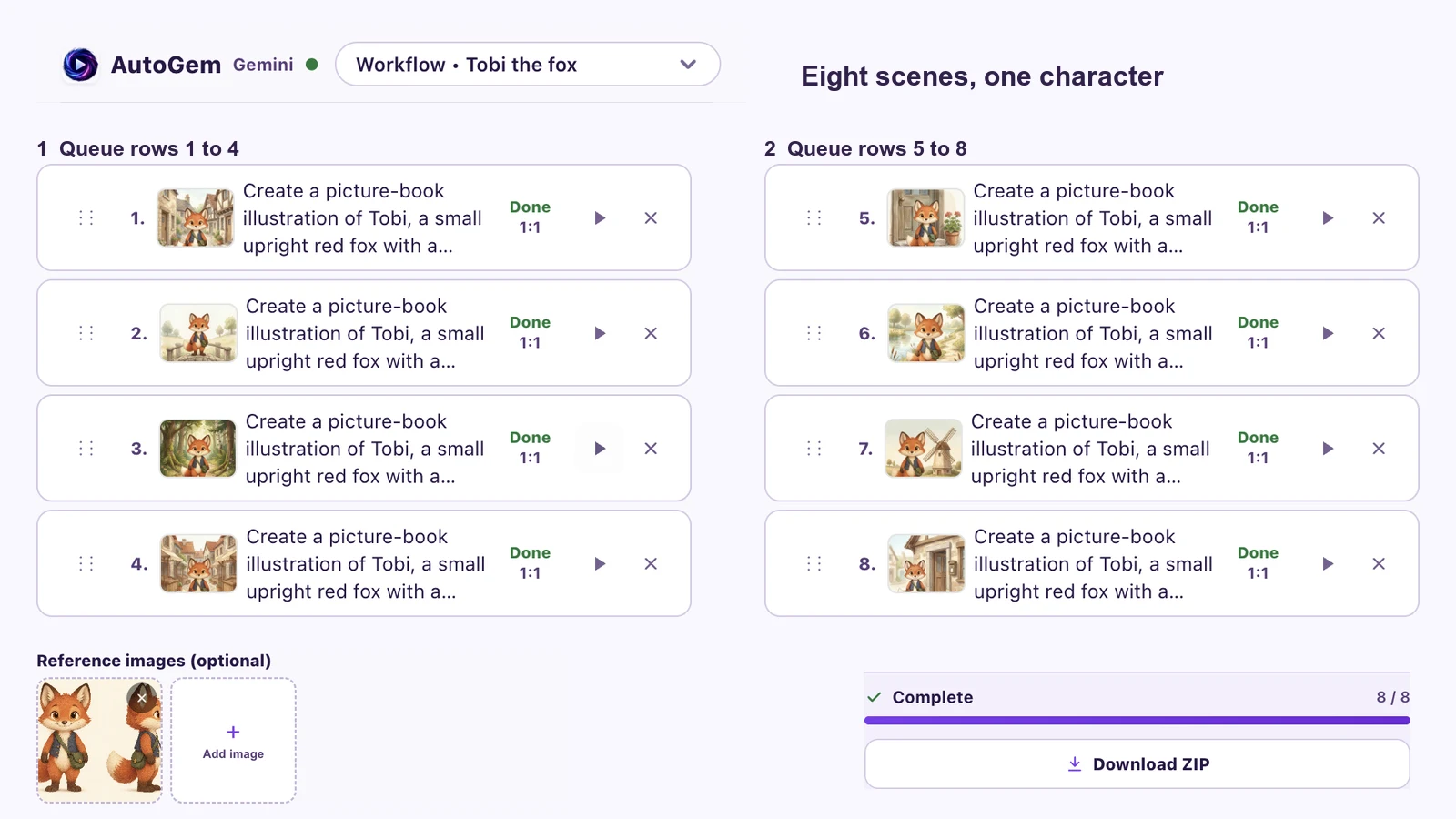
By hand, every illustration means attaching the reference, pasting the prompt, waiting, and downloading. Across a whole book, with retries, that is dozens of rounds. AutoGem is a free Chrome extension that runs the loop for you, inside your own ChatGPT or Gemini tab.
- Install AutoGem and choose a download folder.
- Open ChatGPT or Gemini and sign in.
- In the AutoGem side panel, paste your scene prompts, attach your character reference, choose an aspect ratio, and click Add to Queue. Square suits the common 8.5 × 8.5 inch picture-book size.
- Start the queue and keep the side panel open. Illustrations save to your folder as they finish.
- Work in small sets of scenes, grouped by location or pose, and review each set before queueing the next.
First time using AutoGem? The ChatGPT setup guide and Gemini setup guide cover installation and folder permissions in more detail.
7Score every scene against the reference
Check each image against the details from step 2. For Tobi:
- Face and ears: same muzzle length, eye color and spacing, pointed ears.
- Fur and markings: cream muzzle and tail tip in the same places. Count the tails and paws.
- Outfit: indigo waistcoat, green satchel, and exactly one brass clasp.
- Proportions and style: oversized head, short legs, the same outline weight and watercolor texture.
Mark each scene accept, revise, or reject. For the rejects, fix whatever drifted in the prompt and rerun just those scenes as a short new queue. Download the review scorecard (CSV) to track a whole book in a spreadsheet.
Common questions
Can AI keep a character exactly the same in every image?
Not exactly. With a reference image and a repeated description you can get very close, but small things still drift: a marking moves, a button disappears. That is why you check every image against the reference and rerun the ones that slip.
Can I publish a book with AI illustrations on Amazon KDP?
Yes. KDP asks you to disclose AI-generated content, including images, when you publish. Also be aware that in the US, images generated purely by AI generally cannot be copyrighted, though your text can. Check the current KDP and copyright guidance for your country.
Are AI images big enough to print?
Usually not at full-page size. Print needs about 300 pixels per inch, so a full 8.5-inch page needs around 2,550 pixels across. Most AI images come out smaller, so plan to upscale your final picks before layout.
Can I change the pose or show the character from behind?
Yes, once the character holds steady in simple standing scenes. Add one new pose at a time, test it on its own, and check the face and outfit closely. Complex poses are where drift starts.
Do I need an API key or drawing skills?
No. AutoGem works through the ChatGPT or Gemini website you already use. Your job is writing clear descriptions and choosing the best results.
More guides
Illustrate your next book
Install AutoGem, attach your character reference, and paste in your scene prompts. Every illustration saves to your folder as it finishes.
 Download for
Google Chrome
Download for
Google Chrome