 AutoGem
Generate and download Gemini images in bulk
Paste a list of prompts and AutoGem runs them on gemini.google.com in order, saving each image to your folder as it finishes.
AutoGem is free. Your Gemini account and its image generation limits still apply. See details.
A Gemini result beside its queue
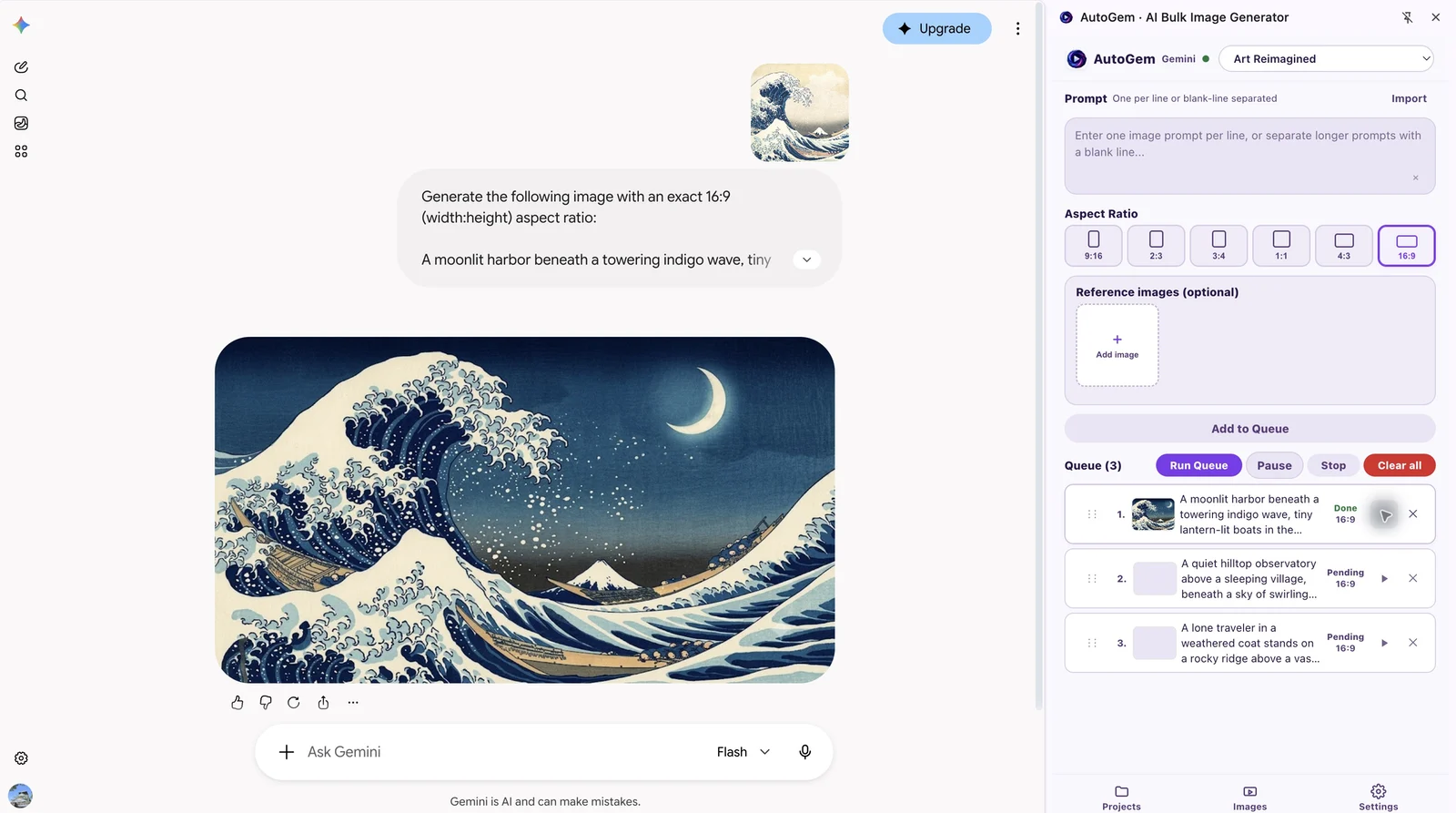
From prompt list to Gemini downloads
Set it up once, then check the images as they come in.
-
Install AutoGem and choose a folder
Add AutoGem from the Chrome Web Store, sign in to the extension, and choose a download folder. Allow folder access when Chrome asks.
-
Open Gemini with image access
Sign in at gemini.google.com with an account that can generate images. Leave the tab open; AutoGem works through it.
-
Add prompts, framing, and references
Paste one prompt per line. Pick an aspect ratio and any reference images, then add the prompts to the queue. Try a few rows before a big run.
-
Run the queue and check the results
AutoGem sends the prompts one at a time. Keep the side panel open so images save to your folder, then check for failed rows or export warnings.
Generate multiple images with Nano Banana in Gemini
Nano Banana is Google’s name for its Gemini image models. To run a list of Nano Banana prompts, AutoGem works the queue on gemini.google.com: send a prompt, wait for the image, save it, move to the next row.
Open Gemini and pick an image option your account offers. Try one prompt first, especially after switching models. Google and your plan decide which Nano Banana versions you can use and how many images you get.
For variations, write each row as a complete instruction, and attach a reference when every image needs the same subject or style. Check a few results before you add more. The product prompts below are a good place to start.
Try three product variations
One mug, three settings. Paste each prompt as its own queue row, pick one aspect ratio, and check the first result before adding more.
Copy the prompts or download the list. Results vary by model and account.
For your own product, attach a photo of it before adding the prompts. Check every image for changes to shape, color, or details before it goes into a listing.
Gemini batch questions
Can I use AutoGem for Nano Banana image batches?
Yes. Nano Banana is Google’s name for its Gemini image models, and AutoGem runs prompts on the Gemini website. Pick an image option your account offers and test a short batch first. Google controls model access and limits.
Do I need a Gemini API key?
No. AutoGem uses the Gemini website in your browser. Sign in with an account that can generate images and you’re set.
Can I bulk download images from all my old Gemini chats?
No. AutoGem saves the images from its own queue runs; it doesn’t export your past Gemini chats. For runs you make with AutoGem, Download ZIP collects every image.
Can I use reference images for Gemini variations?
Yes. Attach references when you set up the queue. They steer the subject or style, but check the results for consistency and accuracy.
What if an image is generated but missing from my folder?
Find the image in AutoGem and read any export warning. Then restore folder access in Settings and keep the side panel open. The image stays in the extension even when the folder save fails.
Will a new download overwrite a file with the same name?
No. If a filename already exists, AutoGem adds a number to the new file. Keep your prompt list with the files to track which prompt made which image.
Can I close Chrome during a Gemini batch?
No. Keep Chrome, the Gemini tab, and the AutoGem side panel open, and don’t let the computer sleep. The queue runs in your browser, not on a server.
More on Gemini
Run your first Gemini batch
Install AutoGem, pick a folder, and try the three prompts above.
 Download for
Google Chrome
Download for
Google Chrome